

How to create darker or lighter shades of a color

Introduction
If you have been working in the field of web designing, graphics designing and used graphics software for a while, you will realize there are times when you need lighter or darker sheds of a particular color. The problem is that given a particular color, you will have to create lighter or darker versions of it. And so my aim in this post is to show you how to create darker or lighter shades of a color.
Hahaha, be warned there is a little mathematics. I know of people who just don’t like it. It’s okay if you don’t like it and we won’t talk about calculus, just simple algebra. Though just bare with me for this post to illustrate a few things here and there, using Maths.
We also assume you know how computers deal with color and if at all you are an Android developer, it does no harm to read this article also. Also know that there are many ways of creating color palettes though I find this method more intuitive to use.
Happy learning !!!
Creating Lighter Shades
Let’s first analyze a scenario, where you have a darker color shade and you would love to create a lighter palette out of this color. A palette is simply a bunch of colors one can choose from when designing user interfaces or brand graphics.
As we all know by now that a computer screen color can be represented by a decimal RGBA value, where; R is Red, G is Green, B is Blue and A is Alpha (transparency). A few things to note:
- Each of these colors and the transparency value is usually given a decimal value from 0 to 255
- At times, values are expressed as a ratio from 0 to 1 and other times, as percentages 0 to 100%.
Since most algebra takes place in the decimal number system, always ensure that all your color values are decimal in nature; that is represented as decimal values between 0 and 255. If you ever find a color represented in any other format, other than this. Please just find a way of converting it to the decimal format.
Formula 1
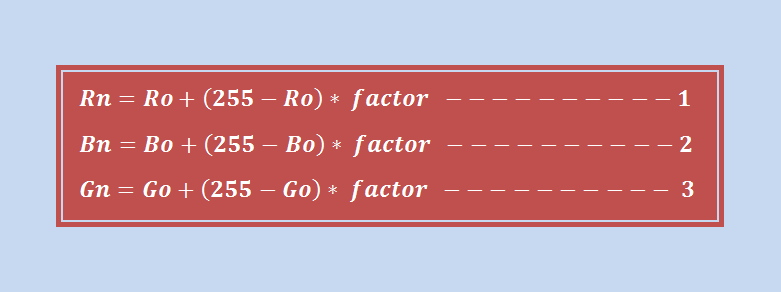
The process is simple; let us assume you are given a color: RGBA (Ro, Go, Bo, Ao) where Ro, Go, Bo, Ao are the old component values of Red, Green, Blue and Alpha respectively. Now, to create a lighter shade of this color, we need to determine the new color component values RGBA (Rn, Gn, Bn, An) using these simple three equations:
Where;
- factor is any ratio of utmost between 0 and 1 for example; 1, 3/4, 1/3, 1/10, 1/2, 1/4, 1/8, 1/16, 1/32, …
- factor is also constant across all the three equations, in other words if you use 1/2, let it be applied to all the three equations.
- factors 0 and 1 are not much useful since 0 produces the same original color (Rn = Ro, Bn = Bo and Gn = Go) whereas 1 produces a white color, RGB (255, 255, 255).
You need to also note the following;
- The factor determines how lighter or darker, your shade will be
- The smaller the factor, the darker the shade
- The bigger the factor, the lighter the shade
Creating Darker Shades
Hmmm, just hope those three equations were not scary to you. I want to add three more equations and we shall be good to go. These will help you determine darker shades of a given lighter color.
Formula 2
Now, keeping all other RGBA variables constant (as in creating lighter shades), these are the equations;

Where;
- factor is any ratio of utmost between 0 and 1 for example; 1, 3/4, 2/3, 1/3, 1/10, ……
- factor is also constant across all the three equations, in other words if you use 1/2, let it be applied to all the three equations.
- factors 0 and 1 are not much useful since 0 produces a completely black color, RGB (0, 0, 0) whereas 1 produces the original color (Rn = Ro, Gn = Go and Bn = Bo)
You need to also note the following;
- The factor determines how lighter or darker, your shade will be
- The smaller the factor, the darker the shade
- The bigger the factor, the lighter the shade
Application (Examples)
To apply the above principles, our task at hand will be to first create a lighter color palette of teal, which is given by the RGB value RGB (0, 128, 128). This is the process;
1. Create the first lighter color variation
Our first set of variables would be the RGB values of the color teal.
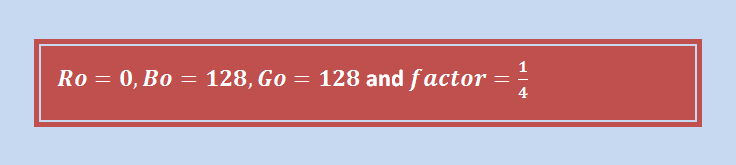
On calculating using the formulae for calculating lighter shades;

Thus, our first lighter color shade of teal is RGB (64, 160, 160)
2. Create other lighter shades
By using the same formulae, maintaining the same factor and using the RGBA output of the previous calculation as the input value of the current calculation, all other values are then calculated. When this is done for four more calculations, we have something similar to this;
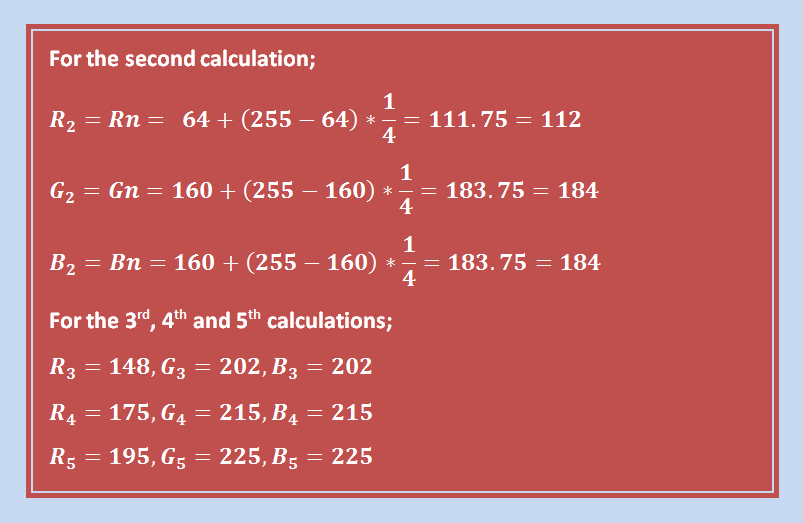
So our final color palette starting from teal (0, 128, 128) to the lightest variation of teal is:
- RGB (0, 128, 128)
- RGB (64, 160, 160)
- RGB (112, 184, 184)
- RGB (148, 202, 202)
- RGB (175, 215, 215)
- RGB (195, 225, 225)
This is how our final color palette looks like in a graphics software (the numbers 1 to 6 represent the colors above):

Following the same procedure, we can still start with a lighter variation of a color, creating a color palette with darker variations of this color. The only difference being that we use the formula 2 for creating other darker shades.
Final Thoughts
If you have done some computer programming before, you can actually turn the above procedure into an algorithm to process your colors and simply automate that task. This way, you will reduce all those manual calculations.


